
I am a fan of ComfyUI. I have been using it for a long time for local image generation. I worked with different models: Stable Diffusion, SDXL, Flux, and Qwen-Image. Local models overperformed “free” services for image generation from OpenAI and Google for a long time. Local models were worse than Midjourney or Leonardo AI. But they are free! You pay only for the electricity. Nowadays, models from OpenAI and Google are not worse than local, and probably they are even better, but they have one disadvantage.
Problem
You have chat interfaces with LLMs. These chats often integrate image generation. They are pretty fine if you need to generate a few images. But they are unusable if you want to generate a bunch of images. Or when you want to generate a few images for each prompt.
Indeed, you have options: either lose a lot of time waiting for responses, switching between windows and tabs. It is not convenient. It is a step back. You had a convenient ComfyUI workflow. And now you have chat, and that is it.
Another option: you can use the Gemini API with ComfyUI. The problem is that you have to register an API key. And it will not be free. Even if you have a paid subscription. Paid subscription includes a very limited API usage. You are able to generate only 74 images per month on 20$ subscription plan…
But if you use the web interface, you can generate 25 images per day, even on a free plan. I understand that it is a way that Google wants to make you a client. But it doesn’t sound fair.
Idea
It is possible to use Playwright to puppeteer your browser. Pass required prompts one by one and generate images. You will get much more compared to the API access included in your Google plan.
Solution
Nothing stops us from creating a custom ComfyUI node. You will have to log in to your Google account, paste the prompt to the chat text field, wait for the result, and download the image. I used Claude Code, 15 minutes on background, a proper task description, and I can generate Nano Banana images in batch in ComfyUI for free!
And that is the case, when I didn’t even need to write any lines of code. I just quickly reviewed them.
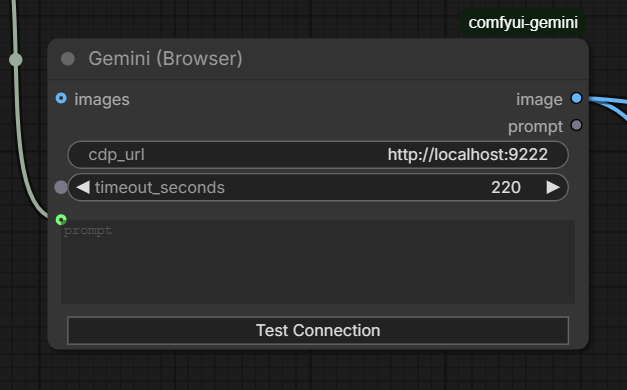
You can easily repeat by yourself with Claude Code or OpenAI Codex. But if you don’t want, here is the source code of mine.
Conclusions
If you think that this article is about ComfyUI or free image generation using Gemini, then you are wrong. This article is about the switching approach in software development. Previously, it did not make any sense to do things like this. You would spend more time writing a custom ComfyUI node. And it was definitely cheaper to use an API key. But not now. Nowadays, you can easily generate missed parts for your workflow. You can automate many boring parts with AI. They can save you time. They can save you money. Just think out of the box.