


I am a fan of Sitecore Marketplace. If you previously tried to customize Sitecore using Sheer UI or SPEAK, then you are probably on my side! It becomes way too easy to develop your own customizations and start using them. But of course, everything can have limitations. And the one limitation that bothered me for a while was the inability to use your Sitecore Marketplace application on your local dev instance.
Or is there this inability? Or has no one tried hard enough to achieve it?
Of course, we will talk about Sitecore Marketplace extensions that make sense locally. Pages Context Panel and Custom Field extension points do not make any sense locally, as you don’t have the apps locally to extend.
How does a Sitecore Marketplace application work?
First of all, we need to figure out how your Sitecore Marketplace application works with Sitecore AI.
Everything that is described in this paragraph is based on the Marketplace SDK code analysis and debugging requests using browser dev tools. I have no access to internal SitecoreAI source code or internal documentation. If I made any mistakes, feel free to correct me.
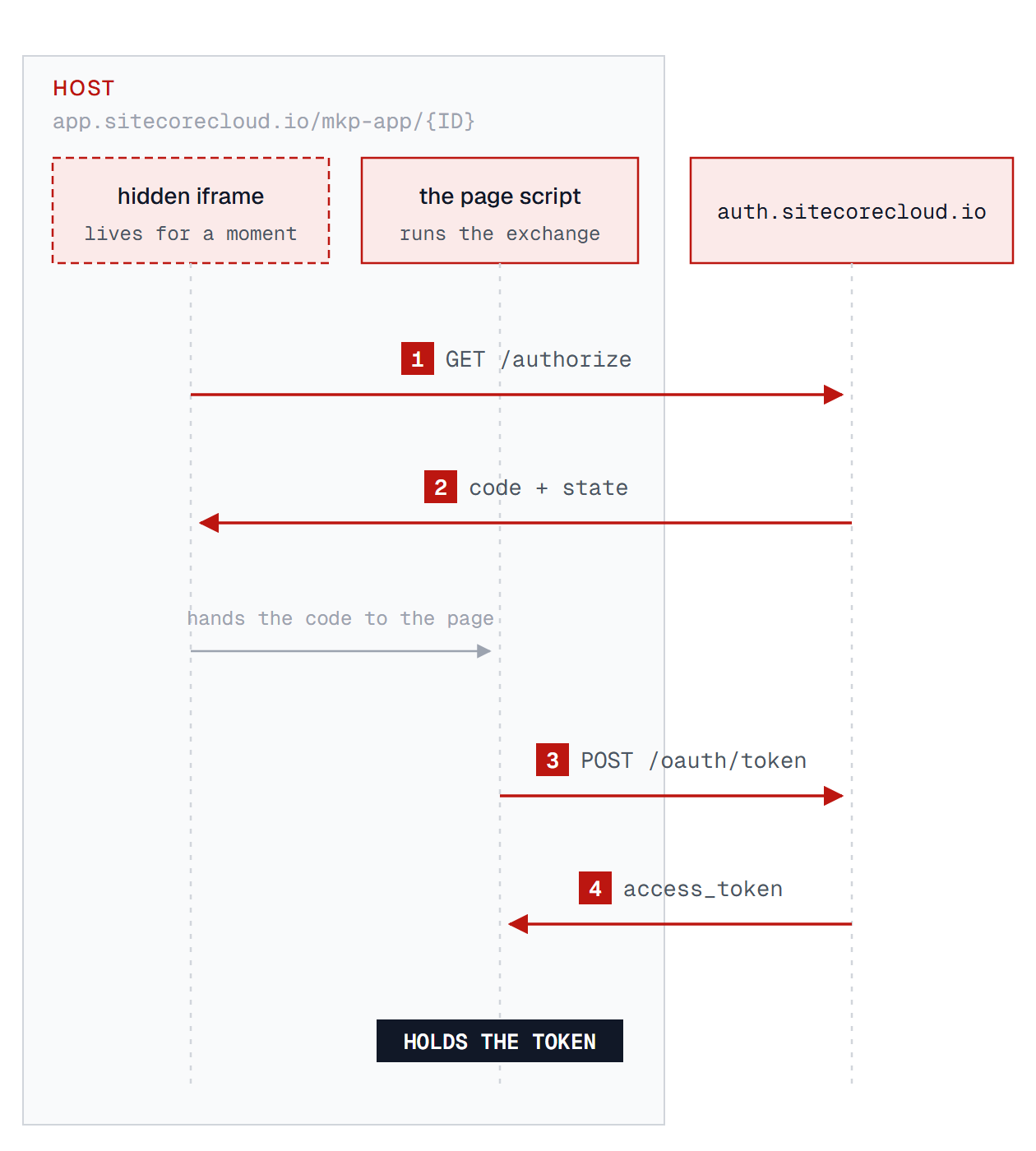
Let’s start by looking at the URL https://app.sitecorecloud.io/mkp-app/{ID}?organization={organization}&tenantName={tenant}. We can see that the URL contains the unique identifier of the application. SitecoreAI used this identifier to find your application. And if we check the network panel and DOM, then we will see two iframes. The first iframe is from https://auth.sitecorecloud.io/authorize. It is used to authorize this page using SitecoreAI authorization. It returns the authorization response: code and state. Then, https://app.sitecorecloud.io uses this code to get the access token from the URL https://auth.sitecorecloud.io/oauth/token. The authorization process deserves the separate article. The important thing for us is that https://app.sitecorecloud.io uses https://auth.sitecorecloud.io to authorize, and then it holds the access token that could be used for interaction with SitecoreAI api.
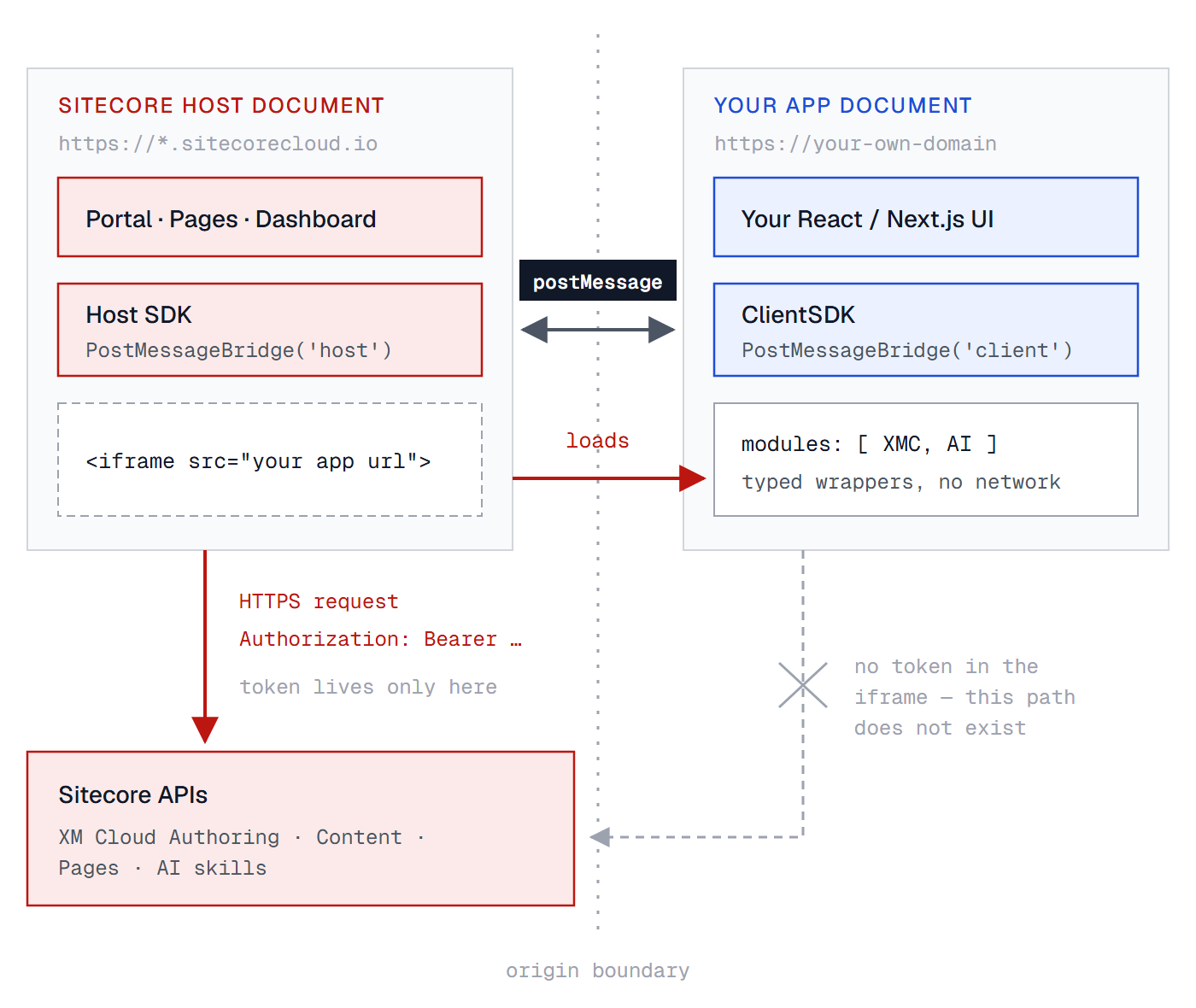
Once authorization is done, the host renders the marketplace application <iframe>. It uses the URL that is configured in the App Studio. The app runs on its own origin and gets no DOM access across the boundary. All interaction happens via window.postMessage. The app receives identity as data, host.user, application.context, never as a credential. The host is a passive listener. It can emit events in Pages mode. But we can ignore it as we don’t have Pages locally. The app iframe sends handshake:init to establish the connection and send requests with required serialized API calls.
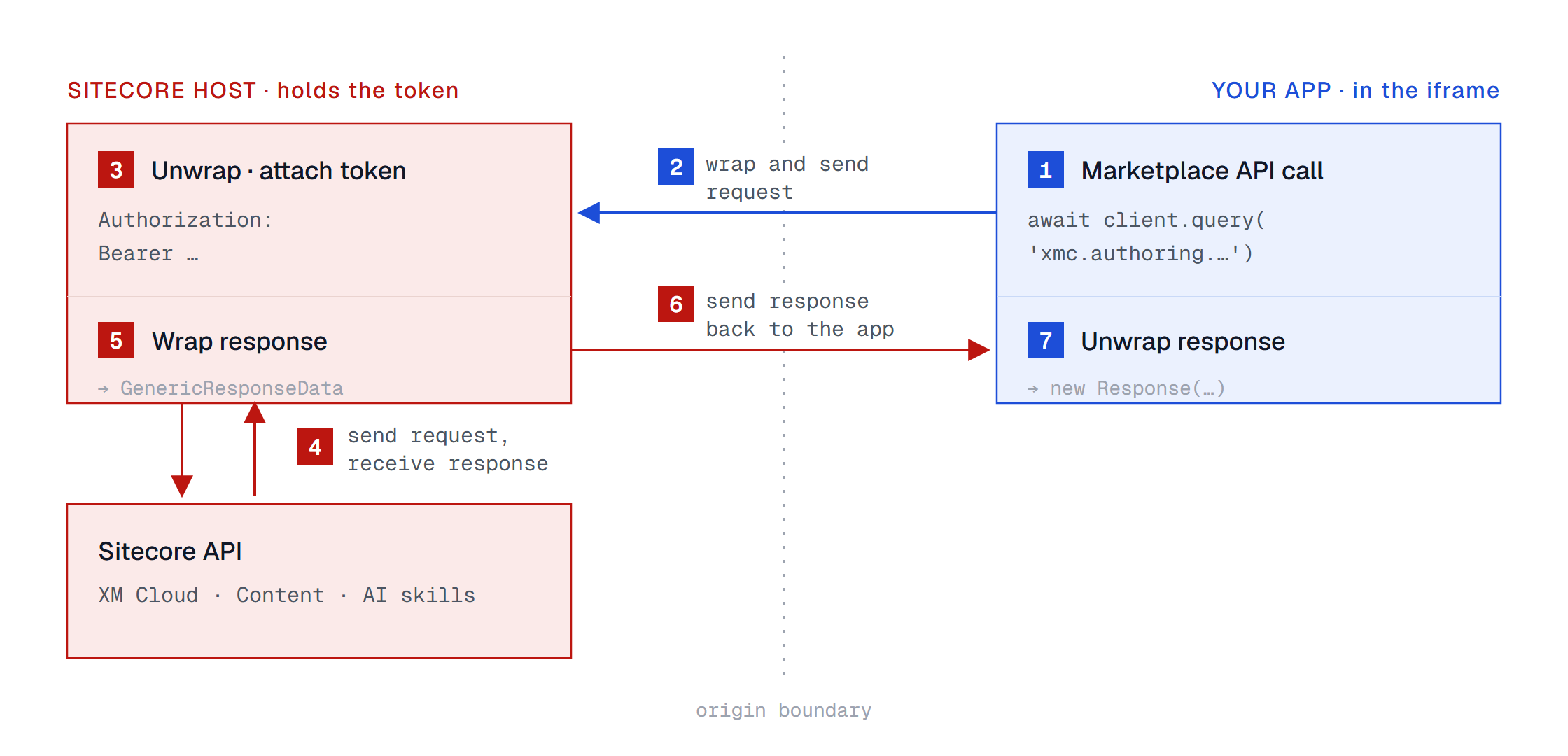
The marketplace SDK wraps all interactions with the SitecoreAI API. And it sends them to the parent window using window.postMessage. Here is an example of a serialized call to the authoring API via Marketplace SDK:
{
  "body": "<ArrayBuffer 409 bytes: {\"query\":\"\\n      query GetItem($where: ItemQueryInput) {\\n        item(where: $where) {\\n          itemId name path database displayName version\\n          template { templateId name }\\n          fields(ownFields: true, excludeStandardFields: true) { nodes { name value } }\\n          children { nodes { itemId name path } }\\n        }\\n      }\\n    \",\"variables\":{\"where\":{\"path\":\"/sitecore/content/Home\"}}}>",
  "headers": {
    "content-type": "application/json"
  },
  "method": "POST",
  "path": "/v1/authoring/graphql?sitecoreContextId=local-preview-context",
  "requiresAuth": true
}
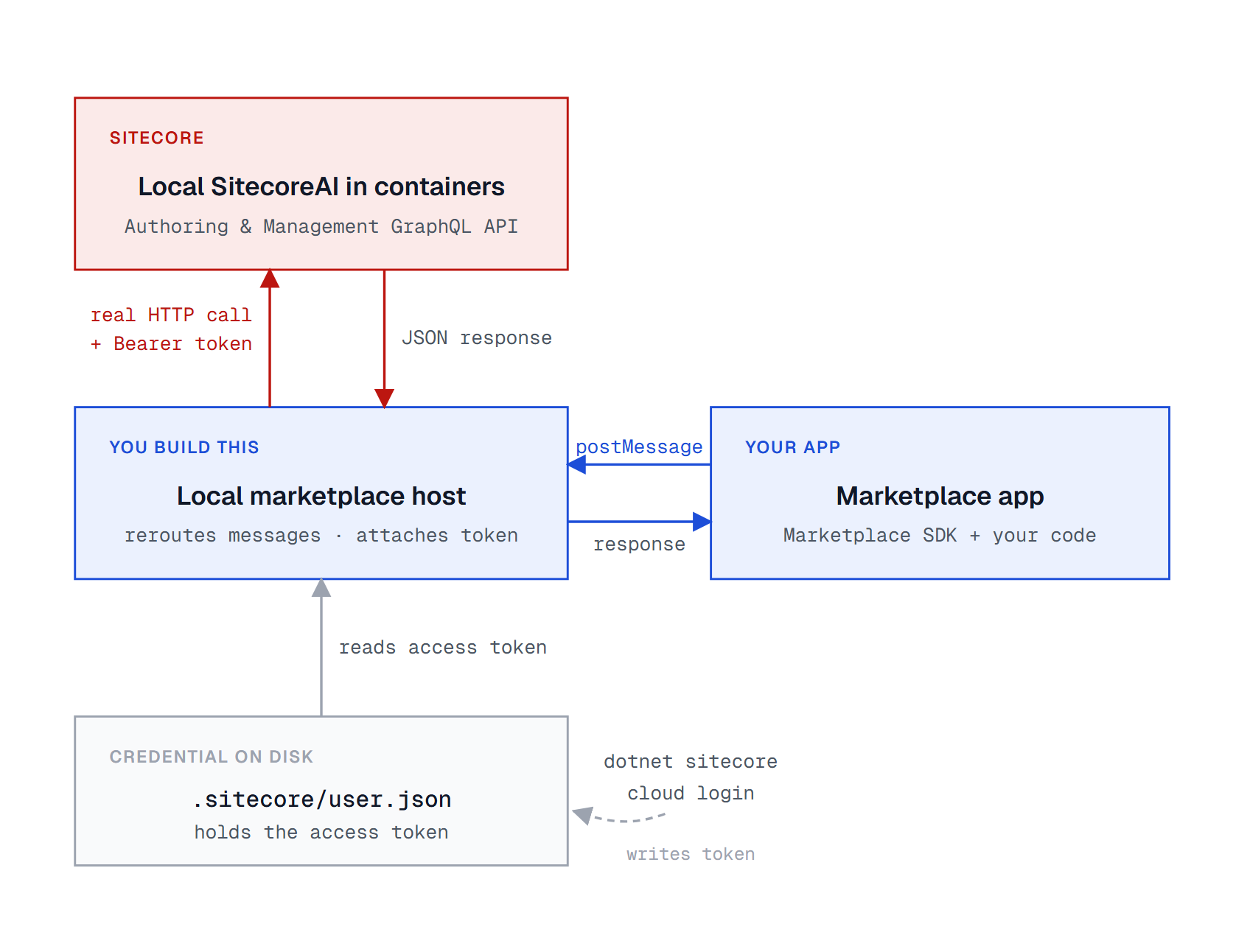
If you are following closely, then you should have the same idea in your mind. We can create our local marketplace host page. It will receive messages from the app and reroute them to the local instance! All that we need is the local address and the access token.
Local Marketplace
Let’s implement the idea of replacing the cloud-hosted SitecoreAI marketplace with a simple app that we are able to run locally.
CORS
We will be running our “marketplace” locally. It will make calls to local Sitecore. The first thing that we have to do is configure CORS policies. We will run it on localhost:5173, so let’s allow this address LocalMarketplace.CORS.config:
<?xml version="1.0" encoding="utf-8"?>
<!--
  Lets the local Marketplace host (http://localhost:5173) call the Authoring GraphQL API
  straight from the browser, the way Cloud Portal does. Replaces the policy from
  App_Config\Include\Sitecore.GraphQL.config, keeping its cloud origin.
-->
<configuration xmlns:patch="http://www.sitecore.net/xmlconfig/">
  <sitecore>
    <corsPolicies type="Sitecore.Owin.Cors.CorsPolicies, Sitecore.Owin">
      <policies hint="list:AddPolicy">
        <corsPolicy type="Sitecore.Owin.Cors.CorsPolicy, Sitecore.Owin"
                    patch:instead="corsPolicy[name='Sitecore GraphQL API v1']">
          <name>Sitecore GraphQL API v1</name>
          <api>/sitecore/api/authoring/graphql/v1</api>
          <allowedOrigins hint="list:addOrigin">
            <allowedOrigin name="sitecoresaasapps">$(env:SITECORE_GraphQL_CORS)</allowedOrigin>
            <allowedOrigin name="localmarketplace">http://localhost:5173</allowedOrigin>
          </allowedOrigins>
        </corsPolicy>
      </policies>
    </corsPolicies>
  </sitecore>
</configuration>
Access Token
We can find the token locally in the .sitecore/user.json. This file is created after running dotnet sitecore cloud login command and authenticating in SitecoreAI. We can run our local marketplace from the same folder where Sitecore is configured. It will be more user-friendly to parse this file and automatically read the token. But we may also run it from somewhere else. In this case, we introduce ACCESS_TOKEN environment variable. You will have to update this environment variable each time you have a new login session to your local instance.
Guinea Pig
We need an application to test if it works locally. I will use my Sitecore Hackathon submission. Sitecore JavaScript Extensions uses almost all available Sitecore Marketplace SDK API. That is why it is a great choice to check if things work with the local instance!
Configuration
This is the tool for devs. Devs run SitecoreAI locally for development. It doesn’t require overcomplicating things by adding or removing apps interface. JSON is the best here:
{
  "hostOrigin": "http://localhost:5173",
  "apps": [
    {
      "id": "local-sje",
      "name": "Sitecore JavaScript Extensions",
      "origin": "http://localhost:3002",
      "routes": {
        "standalone": "/",
        "xmc:fullscreen": "/"
      }
    }
  ]
}
Architecture
Now, we have everything that we need, and we can join things together!
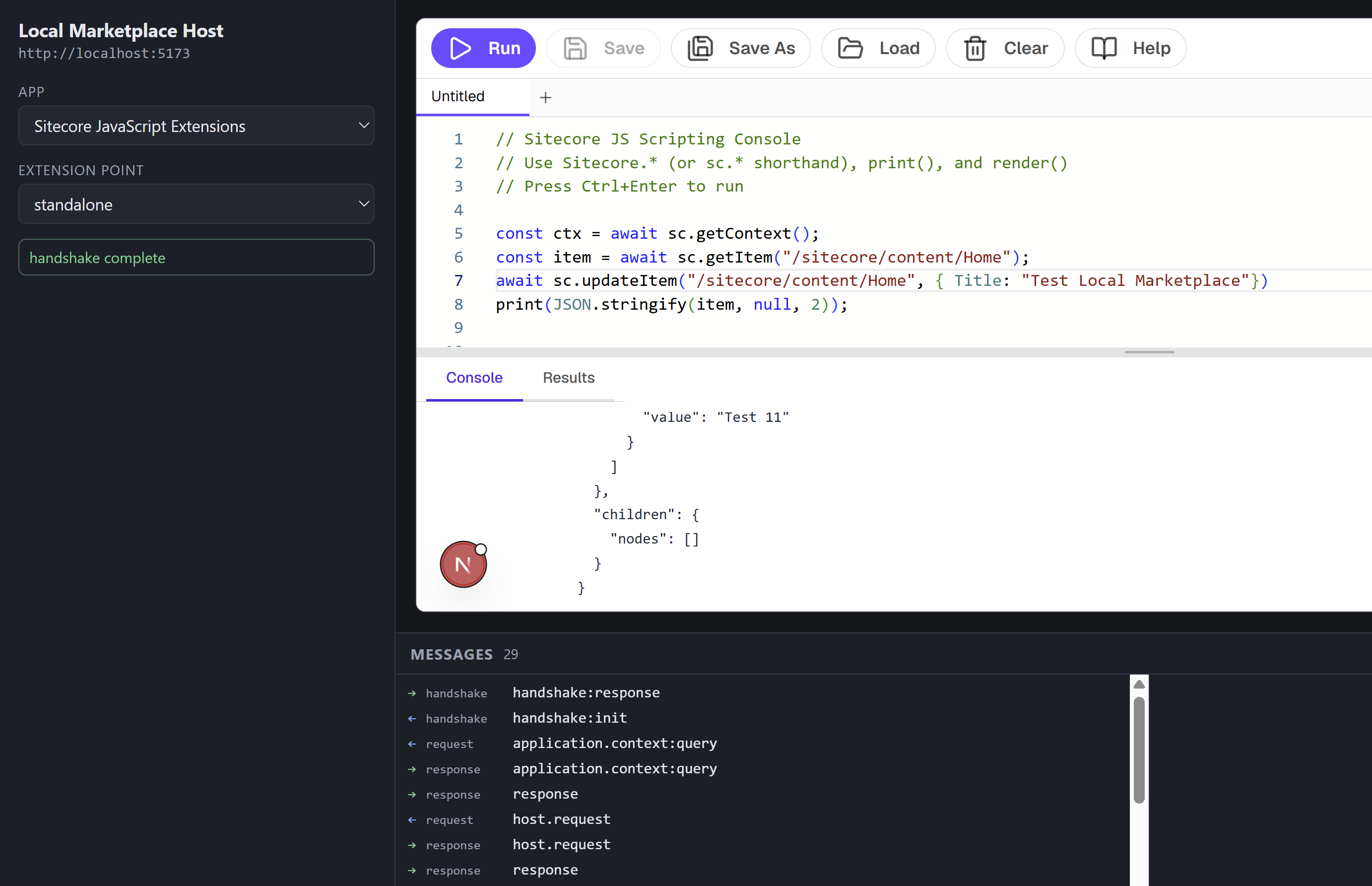
And here is our simple local marketplace. You can select the app, and you can see all requests and responses. It may also be convenient if you want to check how exactly someone else’s app is working. The greatest feature of this approach is that the same Sitecore Marketplace application may work in SitecoreAI and on your local marketplace. You don’t need to change any logic in the marketplace application itself.
Source code
If you get the idea, you can easily repeat all these steps together. Or feed the article to your favorite LLM and ask it to write the code for your needs with your personal wishes. Here is my sample repository that has SitecoreAI local containers, the local marketplace host app, and a few apps to test how it works together. The code in the repository mostly is AI generated, please take that into account when you check it. But this article is not!
Limitations
There are features and APIs in the Sitecore Marketplace that are available only in the cloud. Please have it in mind when you try something and it doesn’t work. Ask yourself, if this feature work with a local instance? Is this API available on your local SitecoreAI?
Marketplace for Sitecore XM/XP?!
I haven’t tried it myself, but nothing stops you from using the same approach to run a Sitecore Marketplace application with your local Sitecore XM/XP. Or with your production Sitecore XM/XP hosted somewhere. The things that will change are enabling the management and authoring GraphQL API and the process of getting the access token. Everything else will work!
Conclusion
I hope you learned something new about the Sitecore Marketplace. And a better understanding will make your apps even more awesome! Especially if you can write them for your local developer needs! So, what will you build? I have a few ideas in mind, stay tuned!